Kumu Livestream Community
- 4.1
- Rating
- 10.00M
- Installs
- Free
- Price

 Analysis by App-foxy
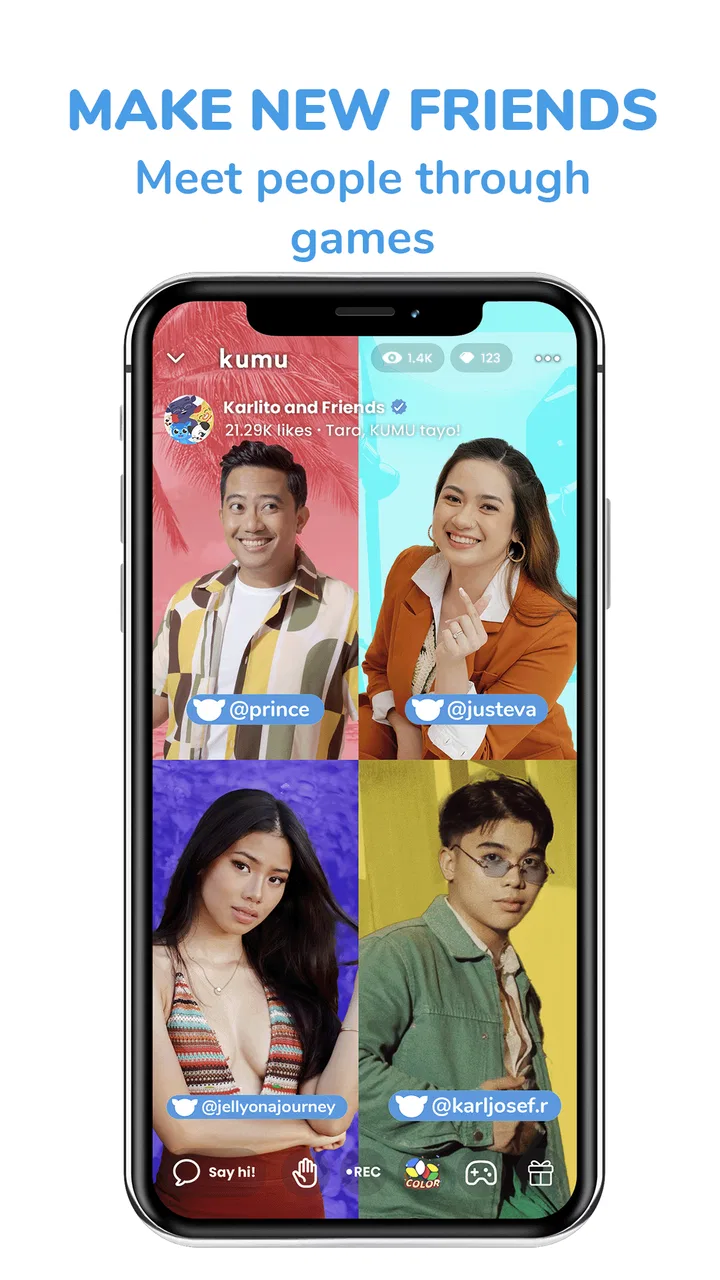
I approached Kumu Livestream Community as a social app for people who want more than a quiet feed of posts. Its focus is live interaction: watching broadcasts, joining conversations, messaging other users, discovering music and games, and taking part in community teams. That combination gives it a noticeably busier personality than a conventional social network, and it also changes what matters most when deciding whether it belongs on your phone.
My first impression is that Kumu is best understood as a live community hub rather than simply a livestream viewer. The app comes from Kumumedia International Pte Ltd and is free to install, while optional in-app purchases range from $0.99 to $99.99 per item. It is aimed at a mature audience with a 17+ content rating, so I would not treat it as a general-purpose app for younger family members.
The service has built a substantial audience, with over 10 million installs and an average rating of 4.1 from around 137 thousand ratings. Those figures suggest that Kumu has found a durable audience, but they do not automatically make it the right social space for everyone. In my experience, the real question is whether you enjoy fast-moving, personality-led interaction and can manage the distractions that come with it.
You May Also Like

 Pandora - Music & Podcasts
Pandora’s Music Is Easy to Start, but Harder to Recover
Pandora’s strength is its low-effort path from a seed to a station. Its weak spot is how much confidence it asks you to place in connection, setup, and quiet recovery.

 AccuWeather: Weather Radar
AccuWeather Review: A Quick, Clear Forecast for Everyday Decisions
For everyday plans, the best forecast is the one you can understand quickly. AccuWeather makes rain timing, radar, and local conditions easy to act on, with a few trade-offs.

 Hill Climb Racing
Why Hill Climb Racing Still Turns Crashes Into One More Run
A tiny car, a bumpy hill and one more upgrade: Hill Climb Racing keeps resurfacing because its simple chaos makes every near-miss feel personal.

 AliExpress - Shopping App
AliExpress Makes Global Shopping Feel Personal, but Shoppers Bear the Risk
AliExpress turns a global marketplace into a pocket-sized discovery engine. Its reach is useful, its shopping loop compelling, and its trade-offs easy to miss.

 Lords Mobile: Kingdom Wars
Lords Mobile Is a Kingdom-Building Routine, Not a Quick Match
A case-by-case verdict on the building, battles, device demands, and social commitments that make Lords Mobile rewarding for some players and exhausting for others.

 PDF Scanner app - TapScanner
TapScanner Makes Paperwork Easier to Capture, Check, and Share
TapScanner makes scanning with a phone feel less like a rescue operation and more like a dependable step in getting work done. Its capture tools are useful, though not flawless.
More From Our News Desk
View All News


How Kumu feels during ordinary use
I find Kumu’s everyday rhythm works best when I decide what I’m opening it for before the live rooms and other activities begin competing for attention. That simple choice helps me tell the difference between a stream worth staying in and a session that is just keeping me busy. The next section looks at how that lively pace can make conversation feel immediate, while also making it harder to follow every thread.
A social app designed around live attention
Many social apps are built around browsing at your own pace. You scroll, pause, save something, and return later. Kumu feels different because live rooms create a stronger sense of “now.” A host may be talking, viewers may be reacting, and the conversation can shift quickly. That immediacy is the main attraction, but it also means the app asks more attention from me than a standard photo or messaging feed.
The combination of livestreams, messenger tools, music, games, and community teams gives users several ways to participate. I can watch passively, chat directly, move into a more organized group, or use the entertainment sections when I want a break from one particular broadcast. This variety helps Kumu avoid feeling like a single-purpose video app, although it can also make the experience feel crowded when I am only looking for one person or one conversation.
For someone meeting friends from the Philippines or looking for Filipino-centered online communities, the app has a clear identity. The store summary highlights Pinoy friendships, and that cultural focus is important: Kumu is not merely another generic livestream platform with an interchangeable audience. Its appeal is strongest when the community context matters to you.
What speed feels like before the busy moments
In a normal session, I would expect the most comfortable experience when moving between a small number of familiar areas: opening a stream, reading the room, sending a message, and returning to a community. The current version is 10.8.2, and the app supports devices running Android 7.0 or later. That broad compatibility is useful for people who do not own a recent phone, but compatibility alone does not guarantee the same level of comfort on every device.
Live video naturally feels more demanding than text messaging. Even when the interface itself responds promptly, the stream still depends on the quality of the connection and the phone’s ability to process moving video. I would therefore judge Kumu less by how quickly a static page opens and more by how gracefully it handles the transition from browsing into an active broadcast.
My practical advice is to give the app a short trial on the device and network you actually use every day. A phone that feels fine with messaging may feel less relaxed once video, chat, music, and interactive elements are active together. That is not a reason to reject Kumu, but it is a reason not to assume that a newer-looking social experience will behave identically on an older handset.
When several parts of the app compete for attention
The heaviest moments are likely to be the ones where live video and rapid conversation happen at the same time. A popular room can produce a fast chat stream, and the temptation is to switch between broadcasts, messages, games, and music without closing anything mentally. Even if the phone remains usable, the experience can become tiring because the app encourages constant movement.
I found that the best way to use Kumu is to choose a purpose before opening it. If I want to catch up with a host, I stay in one broadcast and treat the chat as the main activity. If I want to meet people, I explore community teams instead of jumping between unrelated rooms. That small habit makes the app feel less chaotic and helps me notice whether a room is genuinely interesting rather than simply busy.
Users should also think about data and battery in practical terms. Livestreaming is a more resource-intensive habit than reading text, especially during long sessions. I would use a stable Wi-Fi connection for extended viewing when possible, keep an eye on battery level, and avoid assuming that a phone with limited storage or older hardware will enjoy the same multitasking freedom as a newer model.
Messaging, teams, and the value of smaller spaces
The messenger feature matters because live rooms are not always the best place for a meaningful exchange. A fast public conversation can be entertaining, but it is easy for individual comments to disappear. Moving a conversation into messaging can make it easier to respond thoughtfully, coordinate with someone, or continue a connection after a stream ends.
Community teams offer another useful layer. I see them as a better fit for people who want recurring social contact rather than random encounters. A team can give your activity a sense of continuity, while a livestream can feel more temporary. The trade-off is that organized groups may require more social commitment: keeping up with discussions, understanding the group’s tone, and deciding how visible you want to be.
One non-obvious tip is to use these spaces differently instead of treating every interaction as a public performance. Watch a live room when you want atmosphere, use messaging when the topic needs focus, and explore teams when you are looking for repeated contact. That separation makes Kumu more manageable and reduces the pressure to participate in every feature at once.
Games and music broaden the experience, but not necessarily the focus
The inclusion of games and music makes the app feel like a wider entertainment community. This can be useful when a livestream is quiet or when I want a different way to spend time with people I have met there. It also gives the service more reasons to open it regularly, rather than only returning for one favorite broadcaster.
At the same time, these additions can blur the app’s purpose. If your main goal is private messaging, a dedicated messenger will usually feel more direct. If you want carefully organized music discovery, a specialist music service will likely offer a cleaner experience. Kumu’s advantage is the mixture: music and games sit alongside social interaction instead of replacing it.
I would recommend approaching these sections as supporting features. They are valuable when they help a community stay active, but they may feel secondary if you are searching for a deep standalone games catalog or a focused music player. Kumu works best when entertainment leads back to people and conversation.
Reliability is more than whether the app opens
For a live community app, reliability has several layers. The app needs to launch, streams need to remain usable, chat needs to keep its context, and switching between sections should not make me lose track of what I was doing. A failure in any one of those areas can be more frustrating than a slow static feed because live interaction is time-sensitive.
I would be especially patient during transitions into or out of a broadcast. Live content depends on more than the application itself, so a momentary interruption can come from the network, the phone, or the stream. The sensible recovery habit is to avoid repeatedly tapping every control at once. Give the room a moment, return to the previous section if needed, and reopen the stream rather than creating a pile of duplicate actions.
That recovery approach is also useful when the app feels overloaded. Close areas you no longer need, return to one active task, and restart the session if navigation becomes confusing. I prefer apps that make recovery obvious, but Kumu’s multi-feature design means the user also has some responsibility for keeping the session simple.
Older devices and the Android requirement
Because Kumu supports Android 7.0 and later, it is accessible to a wider range of Android users than an app restricted to only recent operating systems. Still, the minimum operating system should not be confused with a promise of identical performance. A device may meet the software requirement while having less memory, a weaker processor, an older battery, or limited free storage.
On an older phone, I would start with shorter sessions and avoid switching rapidly between livestreams, games, music, and messaging. If the device becomes warm, the battery drops unusually quickly, or other apps begin reloading after I leave them, that is a sign to reduce multitasking. Kumu may remain useful as a focused livestream or messaging tool even when using every section at once is uncomfortable.
People with limited mobile data should also be selective. Text conversations and community browsing are easier to fit into a modest data routine than extended live video. The app’s free price removes an installation barrier, but the practical cost of using it can still include connectivity, battery usage, and optional purchases. I would set personal limits before becoming deeply involved in interactive rooms.
Understanding the mature audience and spending choices
The 17+ rating is an important part of the decision, not a minor label. Kumu’s live and social nature means the tone of a room can vary, and the app should be used with the level of judgment expected from a mature audience. I would be careful about sharing personal details with people I have only met through a broadcast or team, even when the conversation feels friendly.
The optional purchase range also deserves attention. Free access makes it possible to explore the service without paying at the door, but interactive communities can create emotional pressure to spend, particularly when attention, recognition, or participation is tied to digital items. My advice is simple: decide what you are comfortable spending before joining regular live sessions, and never treat a purchase as a requirement for belonging.
This is one area where Kumu differs from a basic messaging app. A private messenger usually has a clearer boundary between communication and spending. Kumu blends social presence with entertainment and community activity, so users need to be more deliberate about separating genuine connection from impulse decisions.
Who will get the most from it
I think Kumu is a strong match for people who enjoy live conversation and want to meet Pinoy friends in a community-oriented setting. It is also suitable for someone who likes moving between watching, chatting, music, games, and group participation without installing a separate app for every activity.
It can be particularly useful in an everyday situation where a person wants company after work or during a quiet evening. Instead of sending one message and waiting for a reply, I can enter a live room, listen to a host, react to the discussion, and then continue a more focused exchange through messenger. If the connection feels promising, a community team may provide a more consistent place to return to.
That workflow is more social than simply watching videos. The viewer is not only consuming content; they are deciding how visible to be, when to speak, and whether to move from a public room into a smaller conversation. Kumu gives those stages room to happen inside one service, which is its most convincing practical advantage.
Who should choose another kind of app
I would skip Kumu if you want a quiet, highly controlled social feed with minimal live interaction. It is also not my first recommendation for someone whose priority is private messaging without entertainment features, or for a user who wants a specialist platform dedicated only to music, gaming, or video discovery.
It may also be a poor fit for anyone who finds fast chat streams stressful or easily loses track of time in social apps. The very qualities that make live communities engaging can make them distracting. If you need strict separation between work, friends, entertainment, and spending, several focused apps may feel easier to manage than one busy hub.
For younger users, the mature rating is a clear reason to look elsewhere. Families should not treat the app as a child-friendly social network simply because it is free to download. The audience, live format, and optional purchases all call for adult judgment.
My performance verdict after weighing the trade-offs
Kumu’s performance story is inseparable from its design. It is not trying to be a lightweight text utility; it brings together live video, chat, music, games, and community teams. That breadth makes it more demanding in attention and potentially more demanding on a phone than a simple messenger, but it also gives users more ways to remain connected when one format becomes repetitive.
I would describe it as a good choice for focused live sessions and a less comfortable choice for uncontrolled multitasking. On a capable device and a dependable connection, the app’s structure can feel lively and rewarding. On an older phone, or with limited data and battery, I would use it selectively: choose one room, keep background activity modest, and move to messaging only when the conversation deserves it.
The current version, 10.8.2, is available for Android devices from version 7.0 onward, and the app has been established since its release on January 9, 2018. Those details give it a mature place in the social category, while the free entry point makes experimentation easy. The decision becomes less about installation and more about whether its live-first rhythm suits your habits.
My final recommendation is positive, with boundaries. I would suggest Kumu to a mature user who wants Filipino-centered social discovery, live personalities, and several forms of participation in one place. I would not recommend it as a universal replacement for a private messenger, a specialist music service, or a carefully filtered social feed. The best way to use Kumu is intentionally: pick the community or broadcast you came for, control your time and spending, and let the extra features support the connection rather than take over the session.
FAQs for Kumu Livestream Community
01What is Kumu Livestream Community?
Kumu Livestream Community is a social livestreaming app where users can watch live broadcasts, chat with hosts, join interactive shows, and build communities around shared interests. It is especially known for entertainment, conversations, games, music, and creator-focused content. After installing it, you can browse public streams or create an account to participate more actively.
02Is Kumu Livestream Community free to download and use?
Kumu is generally free to download on compatible Android and iOS devices, and many livestreams can be watched without paying. However, the app may include optional in-app purchases, such as virtual gifts, coins, subscriptions, or other premium features that support creators and unlock additional interactions. Check the current store listing and payment settings before making purchases.
03Do I need an account to watch livestreams on Kumu?
You may be able to explore some public content without immediately creating an account, but registration is usually required for the full experience. An account lets you follow creators, participate in chats, send gifts, join community activities, and personalize recommendations. Depending on the sign-in method, the app may request basic profile or social-login information.
04Is Kumu safe for children and teenagers?
Kumu is a social platform with user-generated livestreams, so the suitability of its content can vary considerably. Public chats and broadcasts may include mature language, adult themes, or interactions with strangers. Parents should review the app’s age rating, privacy options, spending controls, and community guidelines, and younger users should be supervised when using livestreaming and messaging features.
05Does Kumu require a strong internet connection?
Yes, Kumu works best with a stable Wi-Fi or mobile-data connection because livestream video and real-time chat can consume considerable bandwidth. On weaker connections, streams may buffer, reduce quality, or disconnect. Mobile-data usage can also increase quickly during extended viewing, so using Wi-Fi and checking the app’s permissions and data settings is recommended.
Pros
- Easy-to-use livestreaming tools for creators and viewers.
- Interactive chats make broadcasts feel lively and personal.
- Supports virtual gifts and creator monetization features.
- Wide range of community content and Filipino-focused entertainment.
- Users can join groups and follow creators with similar interests.
Cons
- Frequent notifications may feel excessive without careful settings.
- Some premium gifts and features can become expensive over time.
- Content quality varies widely between different livestreams.
- Public chats may include spam
- mature content
- or unwanted interactions.
- A stable internet connection is needed for smooth video streaming.

Kumu Livestream Community
Gallery